Forward Future Tools Library

Describe Image logo

Describe Image

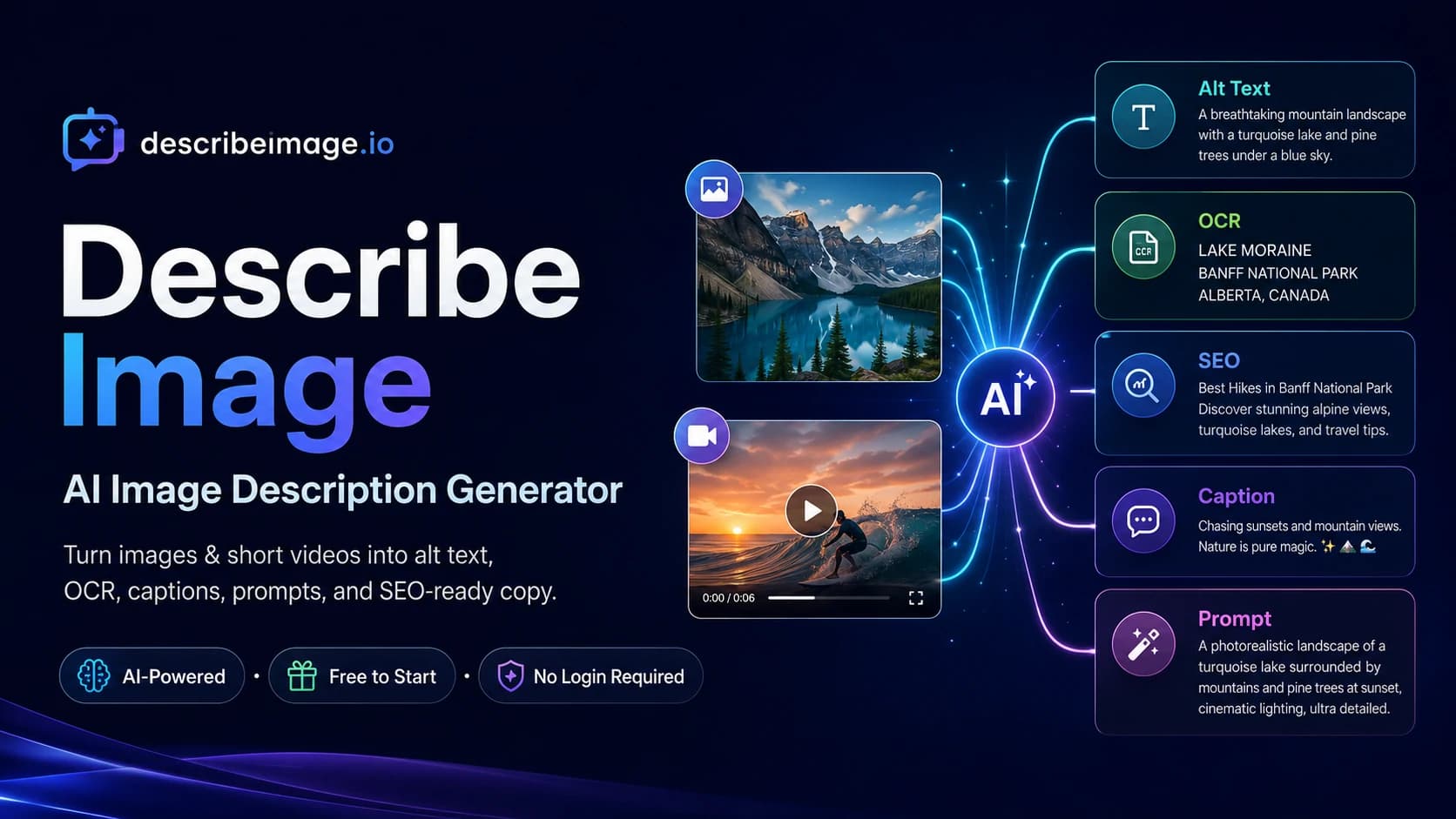
Describe Image turns uploaded images and videos into alt text, OCR, SEO copy, captions, product descriptions, summaries, and reusable prompts for content, commerce, and accessibility work.

Try Describe Image →

describeimage.io·Free + paid plans·Checked 2026-09-29

Describe Image with AIScreenshot to TextPricing — Describe Image Plans for Image and Video AIGenerating Images
Describe Image with AIdescribeimage.io
Describe Image with AI
Describe Image with AIdescribeimage.io

›What is Describe Image?

Describe Image is an AI tool for converting images and videos into written content. Users upload photos, screenshots, charts, documents, product images, infographics, or videos and select an output mode such as alt text, OCR, SEO metadata, captions, product descriptions, summaries, or image prompts. It also includes Chat with Image and Chat with Video features.

›What are the pros and cons of Describe Image?

Strengths

Combines image descriptions, alt text, OCR, SEO copy, product copy, and prompts in one tool
Provides dedicated output modes for accessibility, ecommerce, and image prompting
Supports image and video workflows, including Chat with Video on paid plans
Basic image generation can be tried without signing in
Paid plans include Model 2.0 and higher credit allowances

Trade-offs

Free credits expire after 24 hours
Video tools, Model 2.0, and Chat with Video require a paid plan
The free plan uses a standard processing queue
Batch upload is limited to the Studio plan
Paid plans are billed annually at the listed rates

›What are Describe Image’s key features?

Generates detailed descriptions from uploaded images
Creates alt text and WCAG accessibility text
Extracts text from screenshots, documents, and other images with OCR
Produces SEO metadata, captions, product descriptions, and image keywords
Converts images into prompts for Midjourney, DALL·E, Stable Diffusion, or Flux
Supports video descriptions and Chat with Video on paid plans
Offers batch upload and larger file uploads on the Studio plan

›What are the best use cases for Describe Image?

Create accessibility alt text and longer descriptions for website images
Turn product photos into product copy, SEO metadata, captions, and filenames
Extract text and tables from screenshots, documents, and infographics
Generate reusable prompts from reference images for image-generation tools
Create captions and search-oriented image content for marketing workflows

›What is the pricing for Describe Image?

PlanPriceDetails
Free Plan$0Daily check-in credits, Model 1.0 image modes, and optional saving to My Descriptions.
Basic$95.99/ year9,600 annual credits, Model 2.0, all 11 output modes, video descriptions, Chat with Video, and email support.
Pro$185.99/ year20,400 annual credits, longer video support, faster processing, and priority email support.
Studio$459.99/ year55,200 annual credits, batch upload, long video support, larger file uploads, priority processing, and dedicated support.

Annual pricing is compared with monthly payments, with listed savings of 19.2% for Basic, 22.47% for Pro, and 23.32% for Studio. Free credits expire in 24 hours.

Checked 2026-09-29 · source

›Who is Describe Image best for?

accessibility specialistsUseful for producing short alt text and longer image descriptions for accessibility workflows.
ecommerce sellersProduct photos can be converted into listings, SEO metadata, captions, and product descriptions.
marketersA practical option for creating image copy, captions, keywords, and SEO metadata from uploads.
developersOCR and image understanding can help extract text and tables from screenshots and documents.
content creatorsImage-to-prompt and caption modes support visual content reuse and image-generation workflows.
Not for
  • Teams processing thousands of images through an automated pipeline should look for a tool built for high-volume automation.
  • Users who need video descriptions or Model 2.0 without paying should skip the free plan.
  • Organizations requiring batch upload on the entry plan should note that this capability is limited to Studio.

›What are the best Describe Image alternatives?

›Where can I try Describe Image?

Open describeimage.io →