Forward Future Tools Library

NativeFeel QA
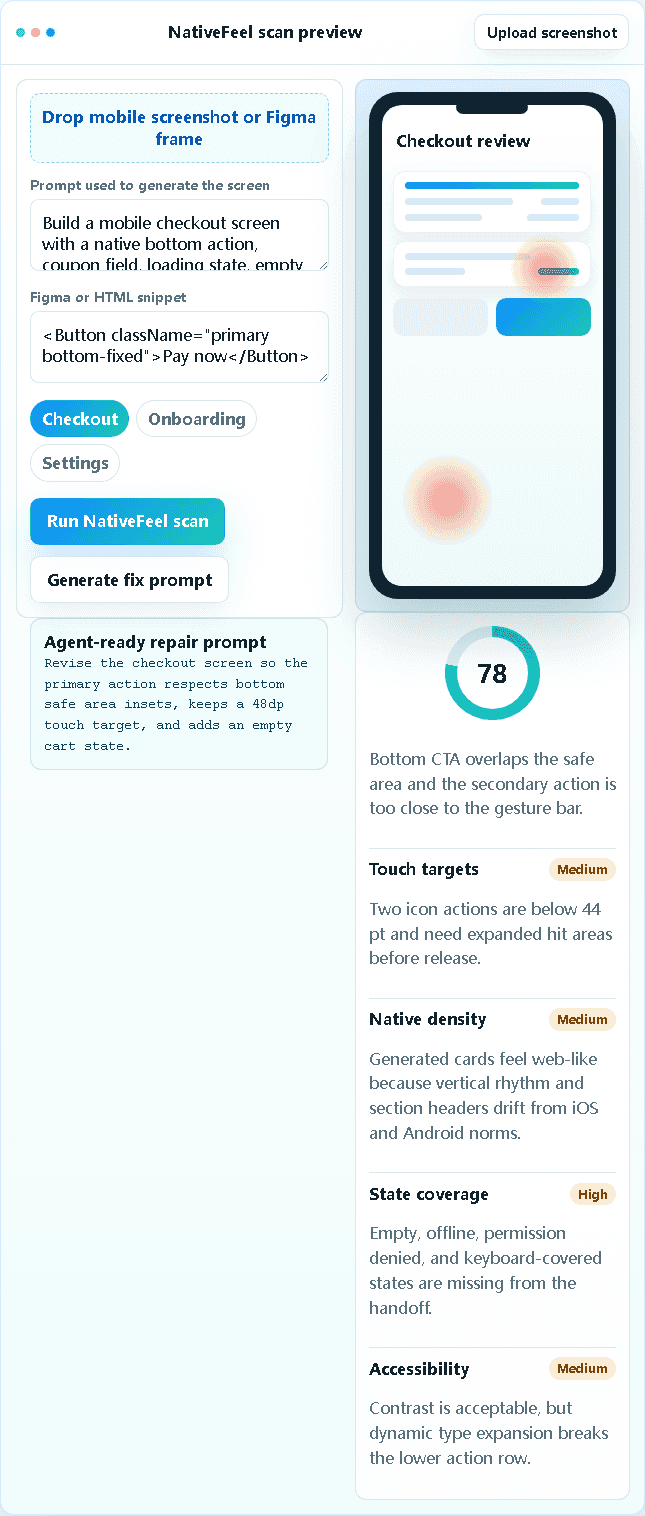
NativeFeel QA reviews AI-generated mobile screens for platform conventions, missing states, accessibility risks, and touch issues, then produces repair prompts for developers and mobile product teams.
nativefeelqa.space·From $39/mo·Checked 2026-09-29
›What is NativeFeel QA?
NativeFeel QA is a review tool for AI-generated iOS and Android app screens. Users upload a screenshot, prompt, Figma frame, or HTML snippet and receive a native-feel score, issue heatmap, state checklist, accessibility findings, and an agent-ready repair prompt. Checks cover platform patterns such as safe areas, touch targets, navigation, typography, and control placement.
›What are the pros and cons of NativeFeel QA?
Strengths
Trade-offs
›What are NativeFeel QA’s key features?
›What are the best use cases for NativeFeel QA?
›What is the pricing for NativeFeel QA?
| Plan | Price | Details |
|---|---|---|
| Indie | $39/mo | 30 screens with native-feel, touch-target, density, state-coverage, and AI fix-prompt checks. |
| Team | $129/mo | 300 screens, plus diff baselines, gesture and safe-area checks, accessibility risk queues, and QA evidence export. |
| Studio | $399/mo | 2,000 screens, plus client portals, bulk screen review, app-store risk packages, and priority support. |
Annual billing saves 50%. Annual checkout prices are $234/year for Indie, $774/year for Team, and $2394/year for Studio.
Checked 2026-09-29 · source
›Who is NativeFeel QA best for?
- Teams that need automated tests running on physical devices should look for a runtime device-testing platform instead.
- Buyers looking for a general-purpose app builder or coding assistant will find this focused on reviewing generated mobile screens.