

Forward Future Tools Library

StudyArena
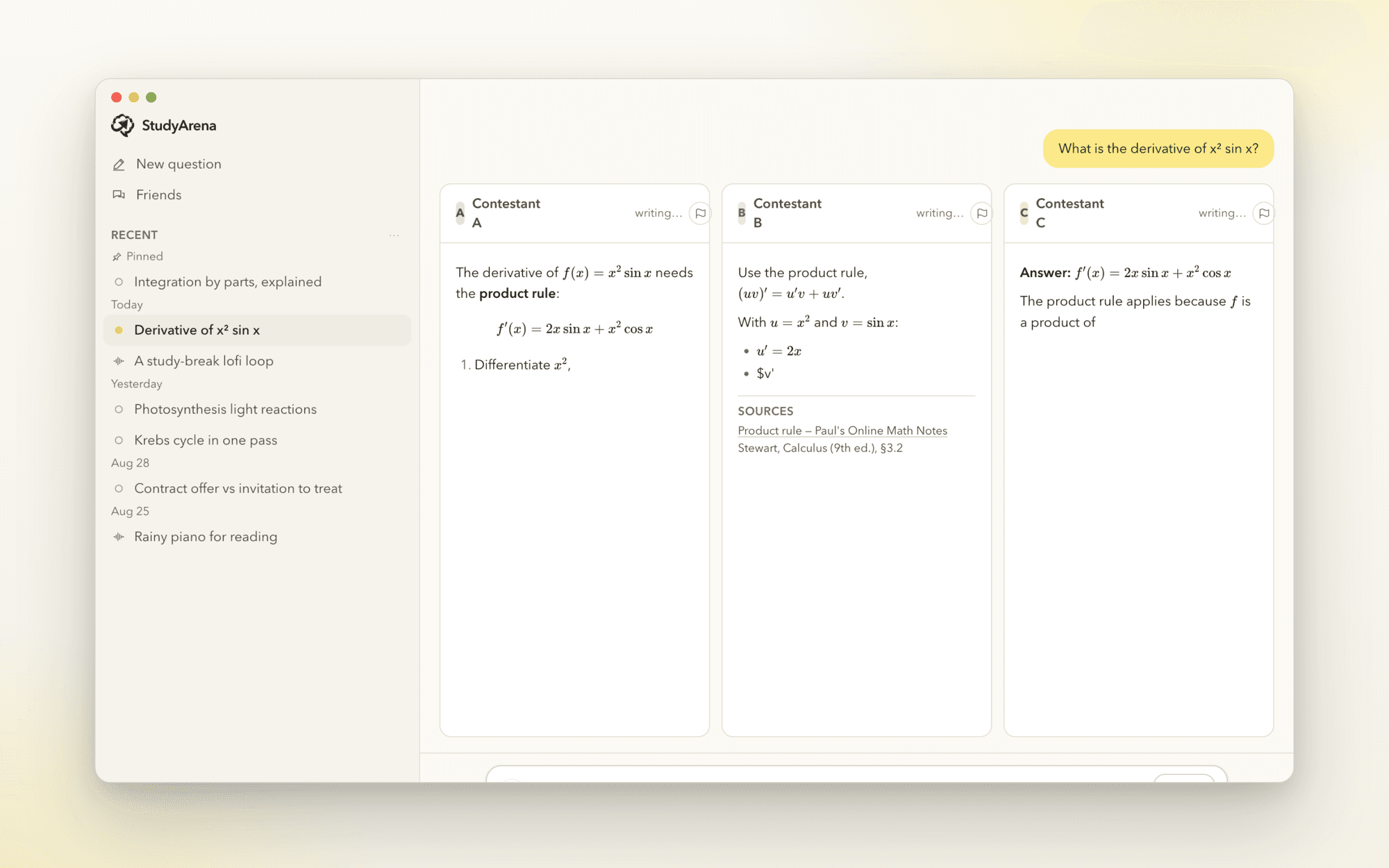
StudyArena gives students three independent AI answers to the same question, then lets them compare, vote, reveal the models, and revisit the discussion across devices.
studyarena.com·Free + paid plans·Checked 2026-11-09

›What is StudyArena?
StudyArena is an AI study workspace for comparing answers from multiple models. It presents three blind answers side by side, lets users vote before revealing the models, and saves the conversation history. Students can use it on the web, desktop, Chrome, iPhone, and Android, and can turn uploaded notes into quizzes or request writing feedback.
›What are the pros and cons of StudyArena?
Strengths
Trade-offs
›What are StudyArena’s key features?
›What are the best use cases for StudyArena?
›What is the pricing for StudyArena?
| Plan | Price | Details |
|---|---|---|
| Free | $0/ month | Compare 3 independent model answers, vote and reveal models, save arena history, generate 10 images monthly, and store 2 GB of private files. |
| Supporter | US$20/ month | Choose any 3 or 6 available models for 120 chosen text comparisons monthly, run 6-answer blind battles, generate 10,000 images monthly, and store 20 GB of private files. |
Supporter is billed monthly and can be canceled any time. It is charged in US dollars with taxes included; a bank may add a currency fee. The free plan adds 5 generated images monthly for each friend invited.
Checked 2026-11-09 · source
›Who is StudyArena best for?
- Students whose main goal is memorizing terms with flashcards or drilling practice tests.
- Users who need every answer to be verified, since the AI responses still need checking against course materials.
- Users who need unrestricted model selection and high-volume chosen-model comparisons without a monthly subscription.
›What are the best StudyArena alternatives?
 Study CopilotChoose this instead if your study process starts with notes, slides, or textbook pages and you want them converted into interactive exercises.→
 UnstuckChoose this instead if you want to chat directly with your class materials rather than compare several independent model answers.→
 MathPandaChoose this instead if your main need is step-by-step help with math homework, photos, or PDF problems.→
 Graspeo→