Forward Future Tools Library

KV-Edit
KV-Edit edits selected image regions while preserving the surrounding background, making it useful for developers and researchers working with DiT-based image editing models.
Try KV-Edit →
xilluill.github.io·Free
›What is KV-Edit?
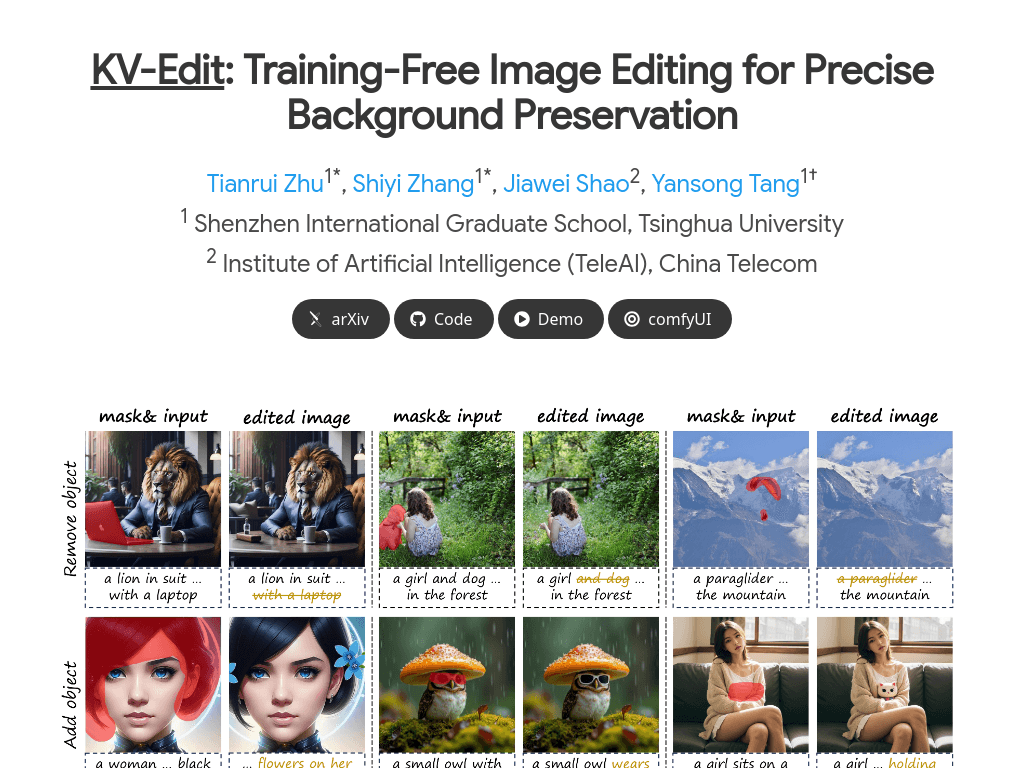
KV-Edit is a training-free image editing method that uses key-value caching in diffusion transformers to preserve background tokens during edits. It supports adding, removing, and changing objects within user-selected regions. The project includes an implementation, code demo, and ComfyUI support.
›What are the pros and cons of KV-Edit?
Strengths
Does not require additional model training
Targets background consistency directly by preserving background tokens
Supports common object-level editing operations
Compatible with DiT-based generative models
Released with an Apache 2.0 licensed implementation
Trade-offs
Designed as a research implementation rather than a documented general-purpose consumer editor
Requires a compatible DiT-based generative model
Use involves a code demo or ComfyUI workflow instead of a clearly documented standalone hosted application
The method focuses on preserving selected backgrounds, so it is not a general-purpose knowledge visualization or dataset management tool
›What are KV-Edit’s key features?
Preserves background key-value pairs during image editing
Supports adding, removing, and changing objects
Works with DiT-based generative models without additional training
Uses an inversion-free method with O(1) KV-cache space complexity
Provides an official implementation and ComfyUI code demo
›What are the best use cases for KV-Edit?
Add an object to a selected image region while retaining the existing background
Remove unwanted objects without regenerating the surrounding scene
Change the appearance or identity of an object in an image
Evaluate text-based image editing methods on image editing benchmarks
Integrate background-preserving edits into a DiT-based research workflow
›What is the pricing for KV-Edit?
Free
›Who is KV-Edit best for?
developersA fit for developers building or testing DiT-based image editing workflows who need background preservation.
researchersUseful for researchers comparing training-free and training-based image editing methods.
soloSuitable for technically experienced solo users who can run a code or ComfyUI implementation.
Not for
- People looking for a conventional no-code image editor with a clearly documented hosted interface should skip it.
- Teams seeking knowledge graph visualization, dataset management, or collaboration features should choose a different tool.
- Users without access to a compatible DiT-based generative model may not be able to use the implementation directly.