

Forward Future Tools Library
SkillForge
SkillForge turns recorded screen workflows into editable SKILL.md files that AI agents can replay, for developers, operators, support teams, and others handling repetitive computer tasks.
Try SkillForge →
skillforge.expert
›What is SkillForge?
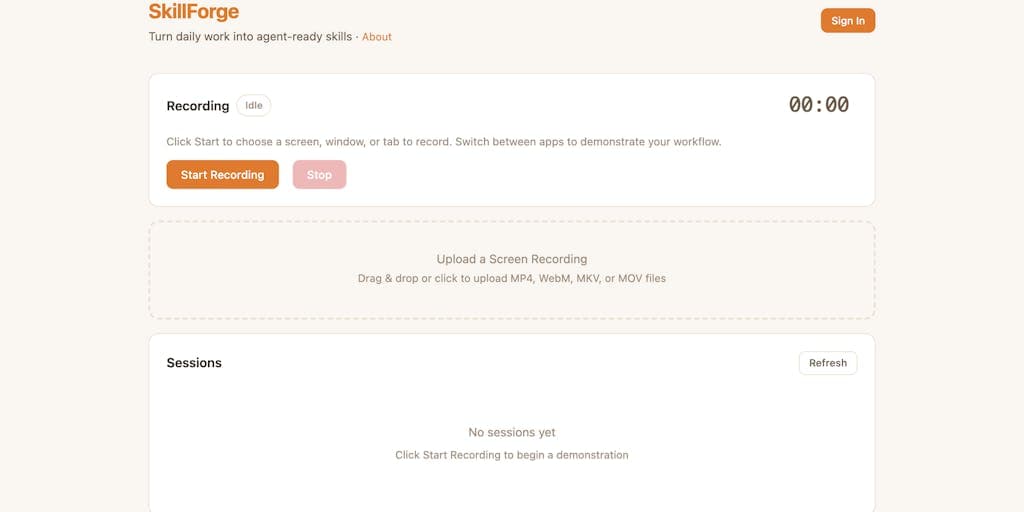
SkillForge records a task as you click, type, and move between apps, then uses AI to extract those actions into a structured workflow. You can review the steps, edit descriptions, reorder actions, trim the recording, or restructure it with AI. The result is a portable SKILL.md file for Claude, ChatGPT, and other agent frameworks.
›What are the pros and cons of SkillForge?
Strengths
Captures a workflow by demonstration instead of requiring scripting
Lets users inspect and revise the extracted workflow before deployment
Produces a portable SKILL.md format that can be used across agent frameworks
Supports tasks involving multiple apps and browser tabs
Basic recording and editing are available before AI extraction usage
Trade-offs
AI extraction uses credits after the free recording and basic editing workflow
The workflow must be demonstrated on screen, which limits it to tasks that can be shown through clicks, typing, and navigation
›What are SkillForge’s key features?
Records clicks, typing, navigation, and multi-app workflows
Extracts recorded actions and groups them into step-by-step workflows
Provides an editor for descriptions, ordering, trimming, and AI restructuring
Exports portable SKILL.md files for AI agent frameworks
Works with browser-based tasks and workflows shown on screen
›What are the best use cases for SkillForge?
Enter recurring data into spreadsheets, CRMs, and online forms
Prepare recurring reports and transfer data between applications
Handle support tickets, customer follow-ups, and other communication workflows
Research across browser tabs and write notes or summaries
Record administrative, IT, finance, and HR procedures for agent replay
›Who is SkillForge best for?
developersA fit for developers who want to turn demonstrated browser or desktop procedures into portable SKILL.md files.
small teamSmall teams can use recorded workflows for recurring support, reporting, data-entry, and administrative tasks.
soloSolo operators can automate repetitive computer work without writing scripts or configuring an automation stack.
›What are the best SkillForge alternatives?
 Owl BrowserChoose this instead if you need a self-hosted Chromium automation tool built specifically for AI agents.→
 AceChoose this instead if you want an autopilot to operate a desktop directly with mouse and keyboard input.→
 ClawHubChoose this instead if you want to discover and reuse existing OpenClaw skills and plugins rather than create workflows from recordings.→
 AnyCrawler→